



Written by the AutoMagToday Content Team | Reviewed by Nitish Ranjan, Automotive Review Expert, automagtoday.com | Last updated: August 2026
Quick Answer:
To reset oil life on honda civic, turn the ignition to ON (don’t start the engine), scroll to the oil life or Maintenance display using the steering wheel or trip button, then press and hold the SEL/RESET (or Enter) button until the reading blinks and returns to 100%. Only do this after you’ve actually changed the oil.
You just finished an oil change in your driveway — or paid your local shop to do it — and that little wrench light or oil life percentage is still staring at you from the dash. Annoying, right? The good news is that learning how to reset oil life on Honda Civic takes about two minutes, needs zero tools, and you definitely don’t have to drive back to the dealer for it.
The oil life indicator is part of Honda’s Maintenance Minder system — the car’s way of telling you how much useful life your engine oil has left, shown as a percentage from 100% down to 0%. Once the oil is actually changed, you have to manually tell the car the job is done; the system doesn’t figure that out on its own. This guide covers the Honda Civic oil life reset for every generation from 2006 through 2026, plus what the codes mean and what to do when the reset just won’t take.
In short: On most Honda Civic models (2006–2026), reset the oil life by turning the ignition to ON, opening the Oil Life or Maintenance screen, then pressing and holding the SEL/RESET or Enter button until the display returns to 100%. The exact menu varies slightly by model year and trim.
How we verified this guide: We compared Honda owner’s manuals for Civic model years 2006–2026 and cross-checked the reset procedures against Honda’s Maintenance Minder documentation. Menu names can vary slightly by trim level and infotainment system, so always confirm with your owner’s manual if your display differs.
What is the Honda Oil Life Monitor?
Older cars told you to change the oil every 3,000 miles, no questions asked. Honda ditched that guesswork years ago. Instead, the Honda Civic maintenance minder uses an algorithm that watches how you actually drive. Short winter commutes are harder on oil than long highway runs, and the system accounts for that.
Honda’s Maintenance Minder system estimates remaining oil life based on engine operating conditions and driving patterns. Honda’s official explanation of how Maintenance Minder works provides additional details about oil-life percentages and service reminders.
So the Honda Civic oil life percentage you see isn’t a straight mileage countdown. It’s a real estimate of oil conditions. Most drivers see it hit 15% (an amber reminder) somewhere between 5,000 and 7,500 miles, and 0% is your hard deadline. When it reaches those thresholds, a wrench icon lights up along with a service code.
One thing that trips people up: the Honda Civic oil change reminder is not the same as your Check Engine Light. The oil life monitor is purely a scheduling tool. The Check Engine Light means the car detected an actual fault. If you want to understand the broader causes, read our guide on why your check engine light is on.
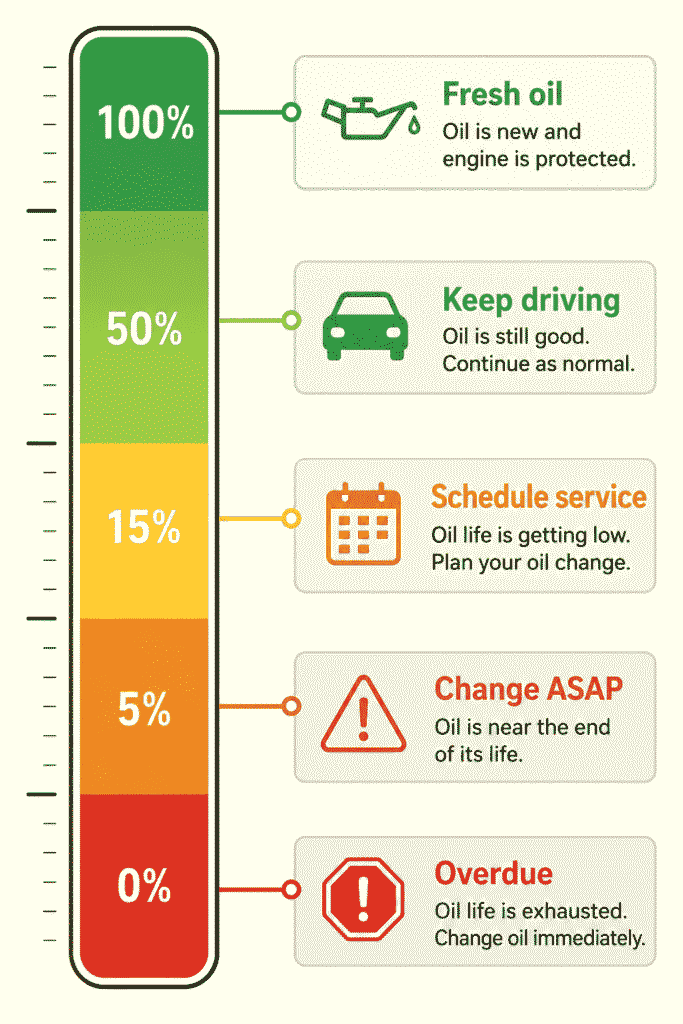
How Does Honda Calculate Oil Life?
This is the part most competitors skip. Honda’s Maintenance Minder doesn’t rely on a simple odometer count — it runs a live model based on real engine data. The main inputs are:
- Engine RPM and load – how hard the motor is working.
- Cold starts – starting a cold engine is tougher on oil than a warm one.
- Idle time – long idling degrades oil without adding miles.
- Trip length – lots of short trips never let oil fully heat up.
- Coolant/oil temperature – heat cycles break oil down.
- Overall driving habits – city stop-and-go versus steady highway.
That’s why two identical Civics can show very different oil life at the same mileage. Someone doing short, cold city hops will see the percentage drop faster than a highway commuter.
When Should You Reset Oil Life on Honda Civic?
- After every completed oil change — once fresh oil and (ideally) a new filter are in.
- Never before has oil been changed. Resetting early tells the car it has 100% fresh oil when it doesn’t.
The reset is the only signal your Civic gets that maintenance happened. If you reset the oil change light Honda Civic before the work is done, the Maintenance Minder restarts its calculation on old, worn-out oil. You’ll blow past the real change interval with no warning — and that’s how engines end up running on sludge.
Honda Civic Oil Life Reset by Model Year
The steps to reset oil life on Honda Civic vary slightly by model year, trim, and dashboard display. Use the instructions below for your Civic generation, and confirm the exact process in your owner’s manual if the menu names are different.
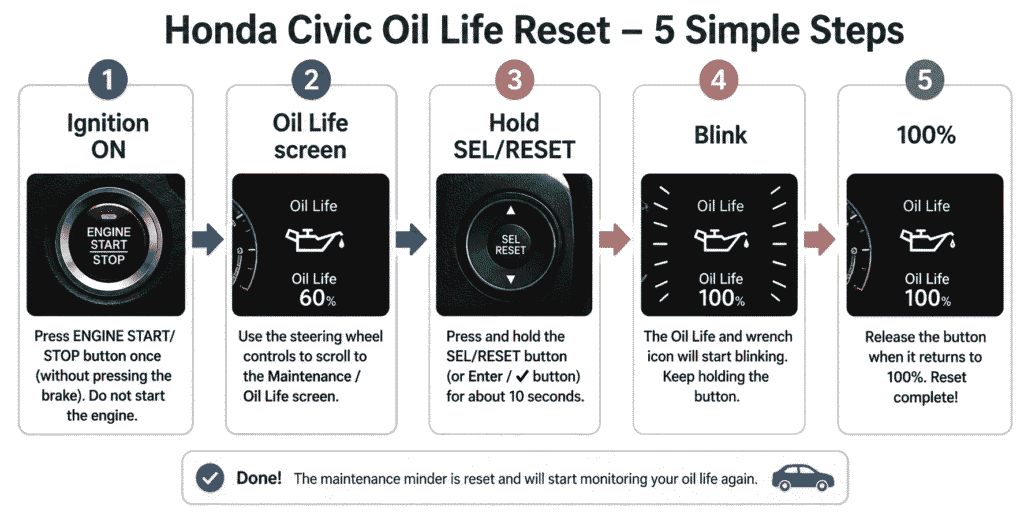
2022–2026 Honda Civic (11th Gen)
- Press the engine START/STOP button without your foot on the brake to switch to ON mode. (Key models: turn the key to the ON position.)
- Use the steering wheel arrows to scroll the driver display to the Maintenance / oil life screen.
- Press and hold the SEL/RESET button (or the display’s checkmark/Enter) for about 10 seconds.
- When the item and wrench icon blink, keep holding until it resets to 100%, then release.
2016–2021 Honda Civic (10th Gen)
- Turn the ignition to ON (push START/STOP once without braking, or turn the key to position II).
- Use the steering wheel controls to bring up the Maintenance / engine oil life screen.
- Press and hold SEL/RESET or the checkmark until the reading begins to blink.
- Keep holding until the Honda Civic maintenance light reset completes and reads 100%.
2012–2015 Honda Civic (9th Gen)
- Turn the key to the ON (II) position without starting the engine.
- Press the SEL/RESET button (trip/info button) repeatedly until Engine Oil Life shows on the i-MID screen.
- Press and hold SEL/RESET for about 10 seconds until the display blinks.
- Release, then press and hold again to confirm and reset maintenance minder Honda Civic to 100%.
2006–2011 Honda Civic (8th Gen)
- Turn the key to the ON (II) position — do not start the engine.
- Press the SEL/RESET button on the dash cluster repeatedly until the engine oil life indicator appears.
- Press and hold SEL/RESET for roughly 10 seconds until the oil life and wrench icon blink.
- Release, then press and hold once more until the Honda Civic dashboard oil reset shows 100%.
| Model Year | Reset Method | Time Required |
| 2022–2026 | Steering wheel + Maintenance display | Under 2 min |
| 2016–2021 | Steering wheel controls | Under 2 min |
| 2012–2015 | SEL/RESET (i-MID) button | Under 2 min |
| 2006–2011 | Trip / SEL-RESET button | Under 2 min |
If your exact steps look slightly different, don’t panic — trims and infotainment options shuffle menus around. The owner’s manual for your VIN is always the final word.
Can You Reset Without Starting the Engine?
Yes — and you actually should. The reset works with the ignition in the ON position, engine off. On push-button Civics, press START/STOP once without pressing the brake so the dash powers up but the motor doesn’t crank. On key models, turn the key to position II. Starting the engine isn’t required and just wastes fuel while you tap through menus.
What Happens After Resetting Oil Life?
Once the reset lands, four things happen: the display returns to 100%, the wrench reminder disappears, the Maintenance Minder starts tracking from scratch, and the timing of your next reminder depends on how you drive from here. Nothing about your engine tuning, transmission, or other settings changes — the reset only touches the maintenance counter.
What Do Honda Maintenance Minder Codes Mean?
Before you reset anything, glance at the letter-and-number combo on your dash. Those are your Honda Civic maintenance minder codes, telling you exactly what service the car wants. A code like “B1” means oil + filter + inspection and a tire rotation.
| Code | What It Means |
| A | Replace engine oil |
| B | Replace engine oil + filter, inspect brakes, suspension & fluids |
| 1 | Rotate tires |
| 2 | Replace air & cabin filters, inspect drive belt |
| 3 | Replace transmission fluid |
| 4 | Replace spark plugs / timing belt (where applicable) |
| 5 | Replace engine coolant |
| 6 | Replace rear differential fluid (AWD models) |
| 7 | Replace brake fluid |
Pro move: Snap a photo of the full code before you reset. Once you clear it, a “1” reminding you to rotate tires disappears too, and it is easy to forget that the service is still due. If you need to check the pressure before rotating the tires, learn how to read a tire pressure gauge.
Honda Civic Oil Capacity & Type
Using the right oil matters as much as resetting the reminder. Here are the typical figures for recent Civic engines — always confirm against your owner’s manual for your exact year:
| Engine | Oil Capacity (with filter) | Recommended Oil |
| 1.5L Turbo (VTEC) | ~3.7 quarts | 0W-20 full synthetic |
| 2.0L Naturally Aspirated | ~3.7 quarts | 0W-20 full synthetic |
| 1.8L (2012–2015) | ~3.9 quarts | 0W-20 full synthetic |
| 1.8L / 2.0L (2006–2011) | ~3.9–4.4 quarts | 5W-20 (per manual) |
Official Honda note: Always use the oil viscosity specified in your owner’s manual. For most recent Civic models Honda recommends 0W-20 full synthetic, but specifications vary by engine and model year.
Oil capacity and viscosity can change by engine, trim, and model year. Always confirm the correct specification in the official Honda Civic owner’s manual before adding or changing oil.
Honda Civic Oil Life Won’t Reset? Try These Fixes
If the Honda Civic oil life won’t reset, it’s almost always something small:
| Problem | Fix |
| Wrong ignition mode | The car must be in ON, not ACC and not running. Push START/STOP once without braking. |
| Button not held long enough | Hold SEL/RESET a full 10 seconds through both the blink and the reset. |
| Wrong screen selected | Display must be on the oil life item, not the trip meter or odometer. |
| Already at 100% | You may have reset it earlier — nothing more to do. |
| Software glitch | Turn the car fully off, wait 30 seconds, restart and retry. |
| Weak or dead 12V battery | A low battery can freeze the cluster. Charge or replace, then retry. |
| Cluster / Maintenance Minder fault | If nothing works, the instrument cluster may need dealer diagnosis. |
Common Myths About Oil Life Reset
- Oil life is based only on mileage. It isn’t — Honda factors in temperature, load, idle time and driving style.
- Resetting changes engine settings. No. It only zeroes the maintenance counter, nothing else.
- Disconnecting the battery resets oil life. False. The value is stored in memory and survives a disconnect.
- The oil reminder is the same as the Check Engine Light. Different systems entirely — see below.
Does Resetting Oil Life Delete Trouble Codes?
No and this is a common mix-up. The oil life reset and the Check Engine Light are completely separate. Clearing your Honda Civic maintenance light reset does nothing to a Check Engine Light or stored OBD-II diagnostic codes. If your CEL is on, you need an OBD-II scanner, not the dashboard reset. Before driving with an active warning, read our guide on whether you can drive with a check engine light on.
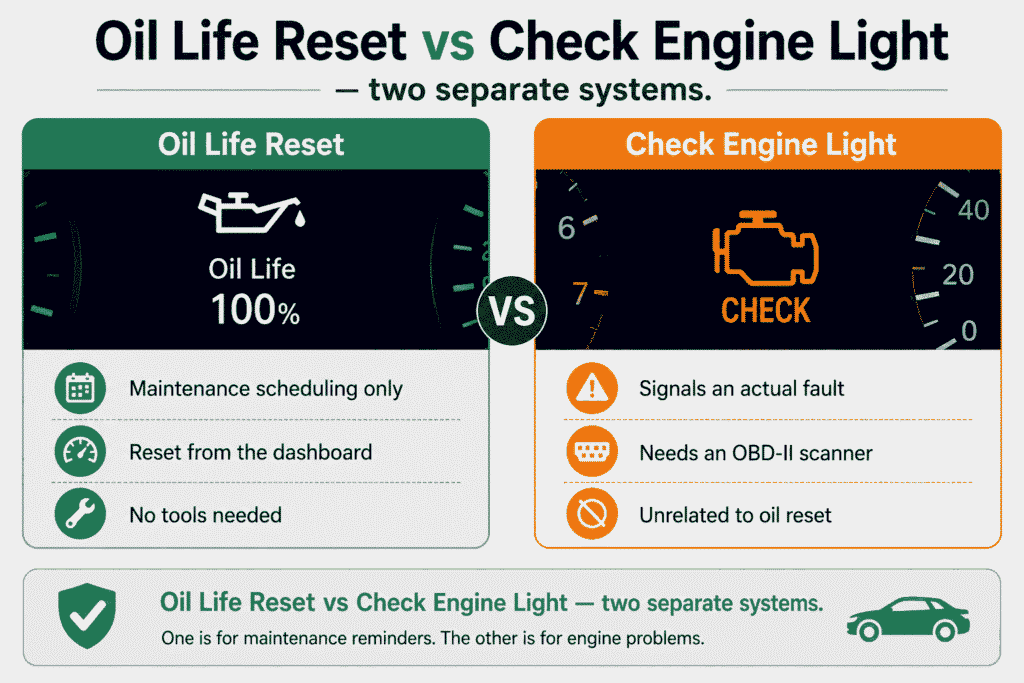
| Feature | Oil Life Reset | OBD-II Reset |
| Clears oil reminder | Yes | No |
| Clears engine fault codes | No | Yes |
| Resets Maintenance Minder | Yes | No |
Common Mistakes to Avoid
- Resetting before the oil is actually changed.
- Ignoring the number codes and skipping a tire rotation or filter.
- Using the wrong oil grade — stick to the viscosity in your manual (most modern Civics use 0W-20).
- Changing oil but reusing the old filter.
- Confusing the oil reminder with the Check Engine Light.
- Not double-checking the display actually returned to 100%.
The Bottom Line
Resetting the oil life on a Honda Civic is usually a quick dashboard procedure that does not require special tools. The exact steps depend on the model year, trim, and display system, but the process generally involves turning the ignition or power mode to ON, opening the Maintenance Minder screen, and confirming the reset. Only reset the oil-life monitor after the oil service has been completed. If the display does not match these instructions, check the owner’s manual for your specific Civic.
Frequently Asked Questions
Why won’t my Honda Civic oil life reset?
Usually the ignition is in the wrong mode or you’re not holding the button long enough. Put the car in ON (not running), select the oil life screen, and hold SEL/RESET through the full blink cycle until it shows 100%.
Can I reset the oil life myself?
Absolutely. Every generation of Civic lets you reset it from the dashboard with no tools. Follow the steps for your model year above.
Does disconnecting the battery reset oil life?
No. The oil life value is stored in memory and survives a battery disconnect. You must reset it manually through the menu.
Will resetting oil life fix the Check Engine Light?
No. Those are separate systems. The oil reset only clears the maintenance reminder — a Check Engine Light needs an OBD-II scan.
What happens if I forget to reset the oil life?
The wrench and percentage stay on and eventually hit 0%, but nothing is damaged. The risk is losing track of your next real change interval, so reset it once you remember.
Can I reset oil life without changing oil?
You physically can, but it’s a bad idea unless a shop already changed the oil and forgot to reset it. Otherwise you lose your maintenance tracking.
Why does my Honda Civic still show Maintenance Minder codes?
Those number codes cover services beyond oil, like tire rotation. Complete each one, then reset. A “B1” won’t fully clear until both the oil service and rotation are done.
Is the oil life monitor based on mileage?
Not purely. It factors in driving conditions, engine temperature, trip length and more — so it’s smarter than a fixed-mileage countdown.
How accurate is Honda’s Maintenance Minder?
Very reliable for normal use, and conservative to protect the engine. For severe conditions like heavy towing, use your judgment alongside it.
Does every Honda Civic use the same reset method?
Close, but not identical. Newer models use the steering wheel and driver display, while 2006–2011 cars use the dash trip button. The core idea — hold SEL/RESET until 100% — stays the same.
Disclaimer: This article is based on information researched and compiled from Honda owner’s manuals, official Honda Maintenance Minder documentation, and reputable automotive sources. Reset procedures, maintenance codes, oil capacities, and recommended oil grades may vary by model year, trim, engine, and market. Always confirm the correct procedure and oil specification in your vehicle’s owner’s manual. Resetting the oil-life monitor does not replace the actual oil change or other required maintenance.